

National Park Tickets
How to reserve time slots and buy national park tickets using the official SINAC website.
Online Reservation Required
For some national parks you will need to make a reservation and purchase your entry ticket online. For all the other parks, you can purchase your ticket at the park entrance. Note that when you book a third party guided tour for a park for which tickets need to be purchased online, sometimes the tour operator will do this for you. For this they require your passport number.
SINAC
Sistema Nacional de Areas de Conservacion Costa Rica, or SINAC for short, is the official organization responsible for the national parks of Costa Rica and the only website where you can purchase your park entrance ticket directly. You can purchase your entry ticket through the official website of SINAC. Creating an account is required.
National Parks with Online Reservation
The following parks are known to me that require an online reservation. This list is from 2025, so it's best to check the SINAC website for the most up-to-date information.
- Corcovado National Park
- Irazu Volcano National Park
- Manuel Antonio National Park
- Poas Volcano National Park
- Rincon de la Vieja National Park
- Tapanti National Park
- Tenorio Volcano National Park (Rio Celeste)
- Tortuguero National Park
- Chirripo National Park
- Carara Nationa Park
- Isla San Lucas National Park
The SINAC Website
First, you will need to create a SINAC account before you are able to purchase entry tickets. Go to the website and follow the steps to create an account. At the top right corner of the website, you can switch between Espanol and English, although when you select English not everything is translated from Spanish.
Initiate a Reservation
- After login, in the menu on the left open the [Buy] drop-down submenu and click on [Online Reservation].
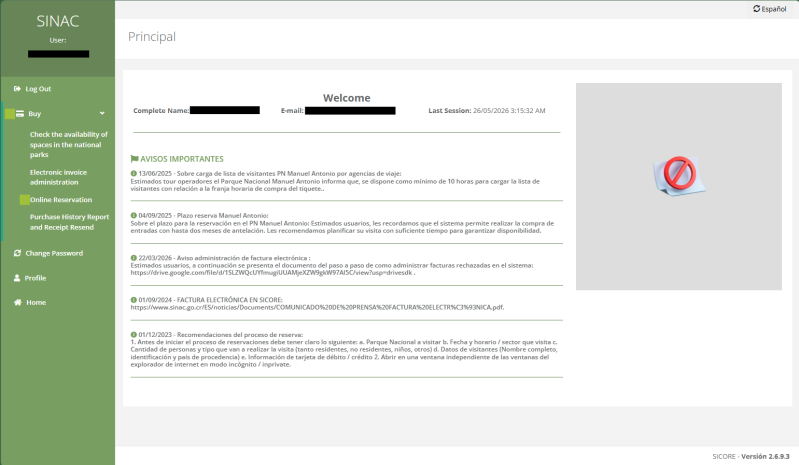
- In the next screen, select the National Park for which you want to buy tickets. The National Parks are mentioned as a National Park/Sector combinations if applicable so pay attention to the sector! For example, Volcan Irazú National Park is mentioned twice as you can purchase tickets to two different sectors: Parque Nacional Volcán Irazú - Sector Cráter and Sector Prusia – PNVI (Sector Crater is the one you need when you are planning to visit the top of the volcano with the crater view).
- Click on [Make Reservation].

Dates and Admission Type
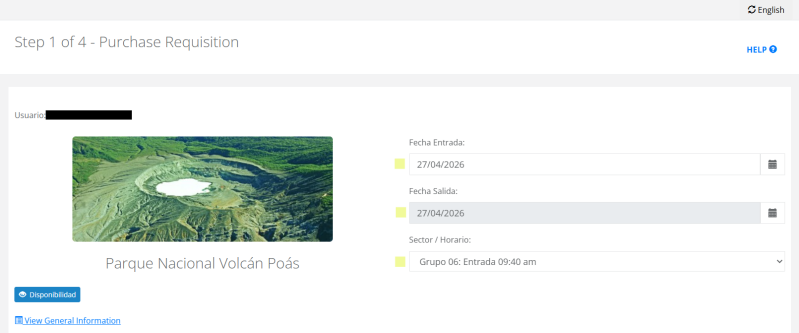
- You can now select the date of entry (Fecha Entrada) and date of exit (Fecha Salida) which in most cases are the same. Next you will need to select a timeslot in the Sector / Horario field.
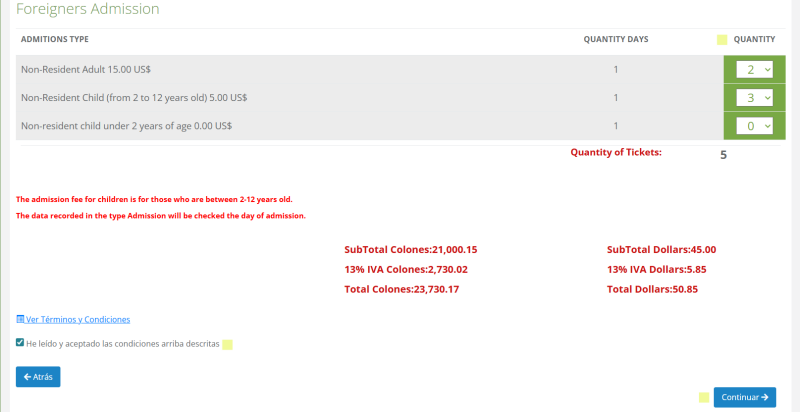
- Further down you need to select the number of tickets. Make sure you make the right selection between foreigner (non-resident) tickets and national (resident) tickets. It might be tempting to buy a cheaper resident ticket and trust that you will bluff your way past the park entrance with your Pura Vida Spanish, however at the next step you will have to enter your passport number and nationality.
- At the bottom left of the page, select that you have red the terms and conditions (He leído y aceptado las condiciones arriba descritas), and click on [Continuar].
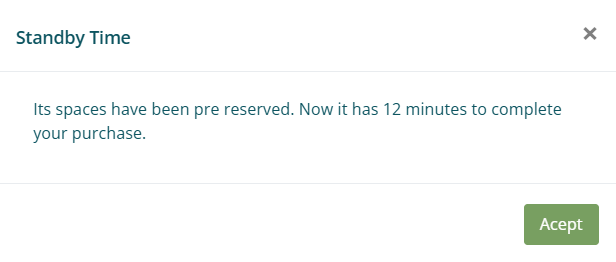
- You will now see a pop-up message saying that your tickets have been pre-reserved. Now you have 12 minutes to complete the reservation.
Passport and Payment Details
- Now you have to enter your full name, passport number, and country of residence. For kids you do not have to enter a passport number, just an asterisk (*).
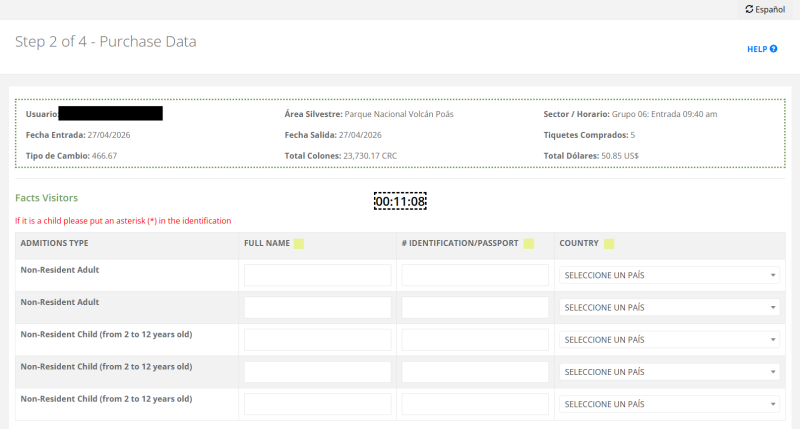
- You will notice that at this step the system also shows an important notice message (Aviso Importante) and requires a lot of information for an electronic invoice (Datos de la Factura Electrónica). As a tourist you do not need this an you should empty the checkbox at "Contains Electronic Invoice". When this is done the fields of "Datos de la Factura Electrónica" will disapear.
- Enter your Credit Card details, make sure you are not a robot by performing the reCAPTCHA and click on [Continue].

- After the final steps you will get a pop-up message that the transaction is accepted.
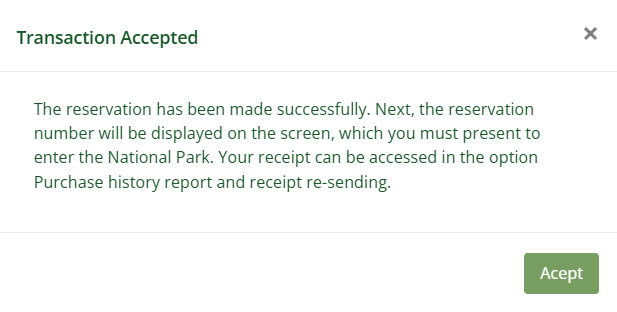
- Make sure you make a screenshot of the reservation number when you are making the reservation on your mobile phone or otherwise take a picture of the reservation number. When you not able to load the confirmation receipt due to bad internet connection at the park entrance you will still have the reservation number available.
- You will get a confirmation by e-mail and you can always access an overview with your purchases in your account.
What to Explore Next
- Check the Prepare page for more interesting topics when you are preparing for a Costa Rica trip.
- Read more about the National Parks of Costa Rica.